File uploader
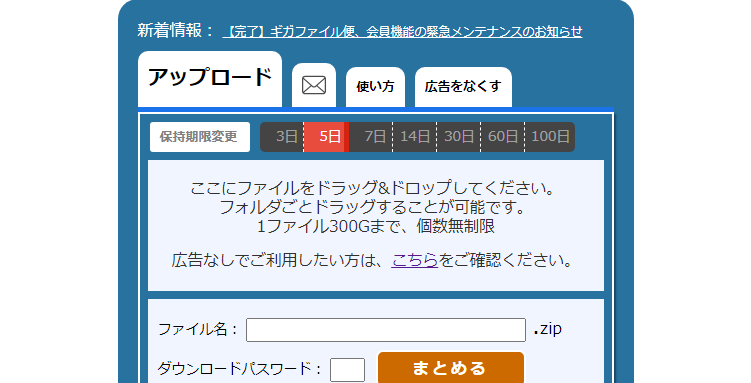
Are There Ways to Send Files Other Than Gigafile?
Many people use Gigafile for transferring large files. However, depending on the use case, other services may be more convenient.
For example, if you want to set a password, share with multiple people, extend the storage period, or send easily from a smartphone, the optimal method varies according to the scenario.
This article will detail representative methods for sending files other than Gigafile, along with their respective features.
Comparison Table of File Transfer Methods
| Method | Features | Recommended Use |
|---|---|---|
| File Transfer Service | Can issue a URL for sharing | Transfer of large files |
| Cloud Storage | Suitable for ongoing sharing or collaboration | Business use / Team sharing |
| Email Attachment | Easy to use but has size limitations | Small files |
| Chat App | Can send immediately | Interpersonal communication |
| NAS / Home Server | Can be managed personally | For advanced users |
Recommended File Transfer Services
The easiest method other than Gigafile is a file transfer service. Simply uploading a file issues a shareable URL, allowing the recipient to download it from that URL.
UploadF
UploadF is a free file uploader that can be used from both PCs and smartphones.
- No registration required, can be used immediately
- Supports drag and drop
- Can upload up to 100 files at once
- Supports password protection
- Allows selection of storage duration
- Files can be individually deleted when no longer needed
It is especially convenient when you want to share multiple files together. When uploading images, you can also use online image editing and OCR features.
Since it can be used immediately without registration, it is suitable for situations where you need to send files urgently.
WeTransfer
This is a widely used large file transfer service overseas. It is characterized by its simple interface, and you can also use the email notification feature.
Firestorage
This service has many users in Japan and is often adopted for corporate use, demonstrating stable operational results.
How to Share via Cloud Storage
If you want to share files continuously, cloud storage is also a strong option.
Google Drive
You can use it if you have a Google account. It allows issuing share links and setting viewing permissions, making it widely used for business purposes.
Dropbox
With robust file synchronization features, it is convenient for handling the same data across multiple devices.
OneDrive
It has strong integration with Microsoft accounts, popular among Windows users.
Differences from Email Attachments
Email attachment is the most familiar method, but many email services have limits on attachment size.
When sending videos, high-definition images, or compressed files, you often hit size restrictions.
Therefore, for sending large files, it is common to use file transfer services or cloud storage.
Recommended Choices Based on Use Case
If You Want to Send Right Away
- UploadF
- WeTransfer
- Firestorage
It's easy since you just have to send the URL after uploading.
If You Want to Share for a Long Time
- Google Drive
- Dropbox
- OneDrive
It is suitable for ongoing file management.
If You Want to Share Multiple Images
With UploadF, you can upload multiple images at once, and also utilize image editing and ZIP functionalities.
Benefits of Choosing Alternatives to Gigafile
- You can choose the most suitable service according to the use case
- Can utilize password protection
- Easier management of multiple files
- Flexible setting of storage duration
- Can be used easily from smartphones
There are many file sharing services available, but the ease of use and sharing methods vary. By selecting services according to your needs, you can share files more securely and efficiently.
Conclusion
In addition to Gigafile, there are many ways to send large files.
For temporary sharing, file transfer services are recommended, whereas cloud storage is best for long-term management.
Especially UploadF can be used without registration and supports password setting and simultaneous uploads of multiple files, making it versatile for both personal and business use.
Choose the service that fits your needs and enjoy safe and comfortable file sharing.