File uploader
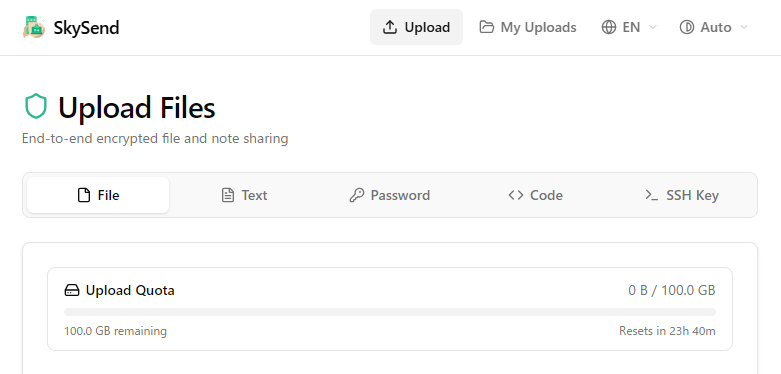
What is SkySend? An Explanation of the Popular Free File Sharing Service
As a method for sending large files, SkySend has recently gained attention as a new service that emphasizes security.
SkySend is a service that allows for free sharing of files and notes, with its greatest feature being end-to-end encryption. Files are encrypted in the browser before uploading, ensuring that not even server administrators can access their content.
Additionally, it can be used without account registration and allows for the specification of expiration dates and download limits, with automatic deletion possible.
In recent years, awareness of information leaks has increased, so it has become important not just to "send files," but to "send them securely."
The Usability of SkySend
SkySend offers convenient features that traditional file transfer services lack.
- No registration required, ready to use immediately
- Ability to send encrypted files
- Password protection supported
- Download limit settings available
- Expiration date settings available
- Automatic deletion upon expiration
- Support for multiple file and folder transfers
- Open source with published mechanisms
Especially convenient is the automatic deletion function based on download counts.
For instance, files that are meant to be downloaded only once, or temporary password information that you want to be removed post-receipt, can be set to auto-delete after use.
Moreover, in addition to files, notes, code, SSH keys, and more can also be shared, making SkySend well-suited for developers and business uses, as files are encrypted in the browser before being sent.
Differences Between SkySend and Gigafile
| Comparison Item | SkySend | Gigafile |
|---|---|---|
| Usage Fee | Free | Free |
| Account Registration | Not Required | Not Required |
| Encryption | End-to-End Encryption | Password Protection Focus |
| Download Limit | Supported | Not Supported |
| Automatic Deletion | Deletion by Date/Count | Deletion by Retention Period |
| Capacity | Up to 15GB | 300GB per File |
| Open Source | Supported | Not Public |
When looking solely at capacity, Gigafile is vastly superior. It supports files up to 300GB, making it suitable for video editing and high-resolution file transfers.
On the other hand, SkySend is designed with an emphasis on safety rather than sheer capacity. It allows for transmissions of up to 15GB and includes encryption and download limit features as standard.
Which Should You Use? Choosing Based on Purpose
The appropriate service varies depending on the intended use.
Cases Recommended for SkySend
- Sending confidential documents
- Sharing files that include personal information
- Files that should be downloaded only once
- Wanting automatic deletion after a certain period
- Wanting to securely share passwords or codes
Cases Recommended for Gigafile
- Sending large files over several tens of GB
- Sharing video production or editing data
- Prioritizing capacity
- Wanting the recipient to use a familiar service
In summary, if safety is a priority, choose SkySend, and if capacity is a priority, choose Gigafile.
Japanese Services That Can Be Used Instead of SkySend
Besides SkySend and Gigafile, there are also easily accessible file sharing services.
For example, UploadF is a free service that allows you to upload files without account registration.
- Compatible with PC and smartphones
- Supports drag and drop
- Password setting available
- Retention period options available
- Individual file deletion function
- Supports simultaneous upload of 100 files
When sharing images, features such as online image editing, OCR capabilities, and AI training prevention functions can also be utilized, making it convenient for those who handle images often.
If you simply want to share files, it might be a good choice alongside SkySend or Gigafile.
Conclusion
SkySend is a new file sharing service equipped with end-to-end encryption, download limits, and automatic deletion features.
While Gigafile boasts impressive capacity, SkySend is better suited for users who prioritize safety and privacy protection.
Additionally, if you are looking for user-friendly file sharing services in Japanese, UploadF is also a strong contender.
Choose the optimal service according to the type and importance of the files you are sending.